Client Research for Freelancers: How Client Radar Finds Companies That Need You
On this page (5 sections)
Most "lead generation" tools hand you a spreadsheet of names and leave the hard part, knowing why you should write to any of them, to you. Client Radar does the research first and the list second. This guide shows what a search does step by step, what it refuses to invent, and how to read what comes back.
Quick answer: you describe who you want, confirm the profile DealInSec reads back, and a search looks for companies that match, opens each company's own website, extracts what it does and who runs it, looks for recent dated signals, scores the fit, and shows every fact with its source and date. Guesses are labelled as guesses. You decide who becomes a lead.
The six steps of a search
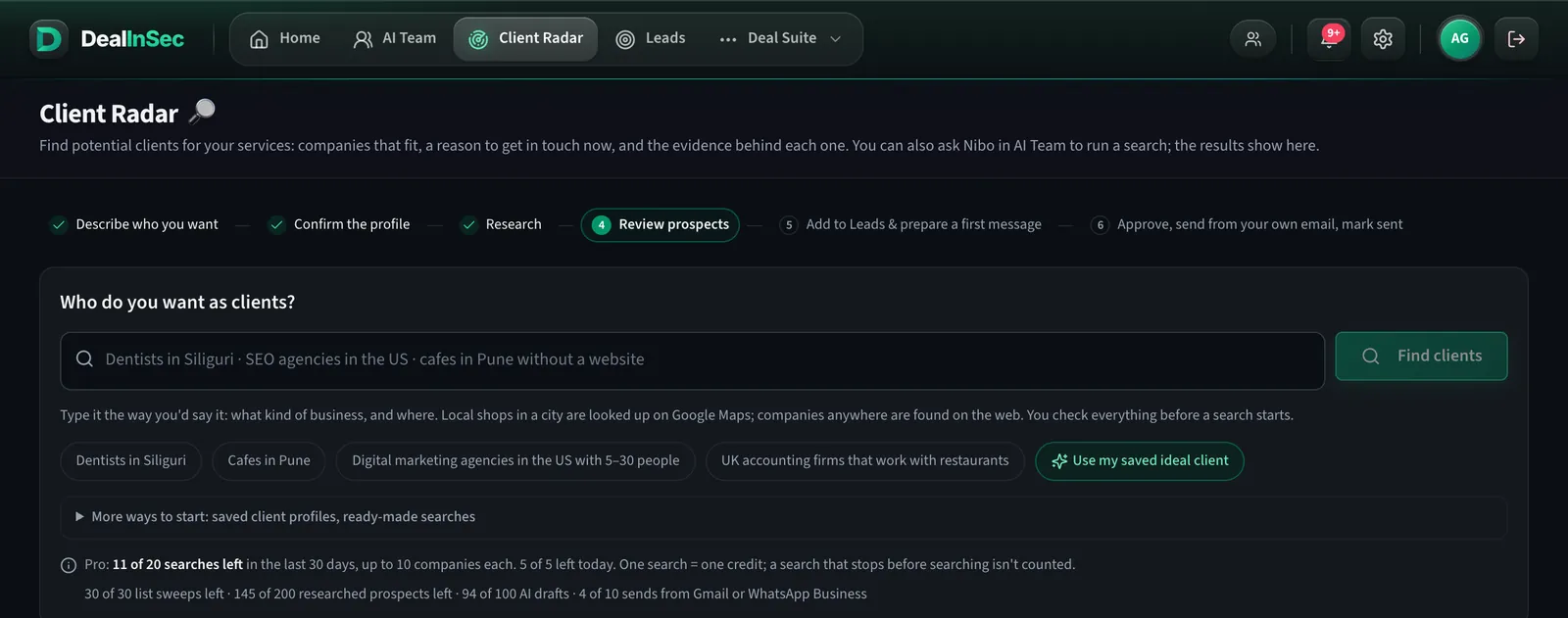
The strip at the top of Client Radar is the whole method: describe who you want, confirm the profile, research, review prospects, add to Leads and prepare a first message, approve and send from your own email. Each search walks those steps and stops wherever you tell it to.
1. Describe, then confirm
Write it the way you would say it. "D2C skincare brands in Bengaluru doing their first serious e-commerce push" is a profile; "I do web design" is not. DealInSec turns your sentence into a structured profile (industry, size, geography, the problem you fix) and shows it to you. Nothing runs until you confirm it, so a vague sentence costs you a correction, not a search.
2. Find candidates
For companies anywhere, the search queries the web with several phrasings of your profile and collects candidate companies. For local businesses in a city (dentists in Siliguri, coaching institutes in Kota), it lists matching businesses from Google Maps with their address, phone, website if listed and a link to the listing. Those listings are shown for that search and not stored; you choose which websites to research.
3. Read each company's own website
This is the step that separates research from a list. For every candidate, Client Radar opens the company's site and reads what it sells, who it sells to, its size signals, its team or founder pages, and recent posts. A company with no real, reachable website is set aside rather than padded out.
4. Look for a dated reason to write now
Good outreach says why now. The search looks for recent, dated events: a product launch, a hiring post for a role near your service, an expansion, a publishing pattern. Each one carries its date and its source link. An undated signal is shown as undated, not dressed up as news.
5. Find the decision maker, honestly
Where the company publishes a founder, CEO or head of the relevant function, the search names them with the page it found them on. Where it does not, the field stays empty. Email addresses are shown when they are on the company's site or a connected contact provider returns them; DealInSec never generates an address by pattern-guessing and calls it verified.
6. Score and label
Each company gets a fit score against your profile and a readiness label: ready, needs evidence or review, excluded. Anything inferred (a likely pain, a possible opportunity) is marked as a guess. You can see how many points of the score are unknown rather than being shown a confident number built on air.
Reading the results
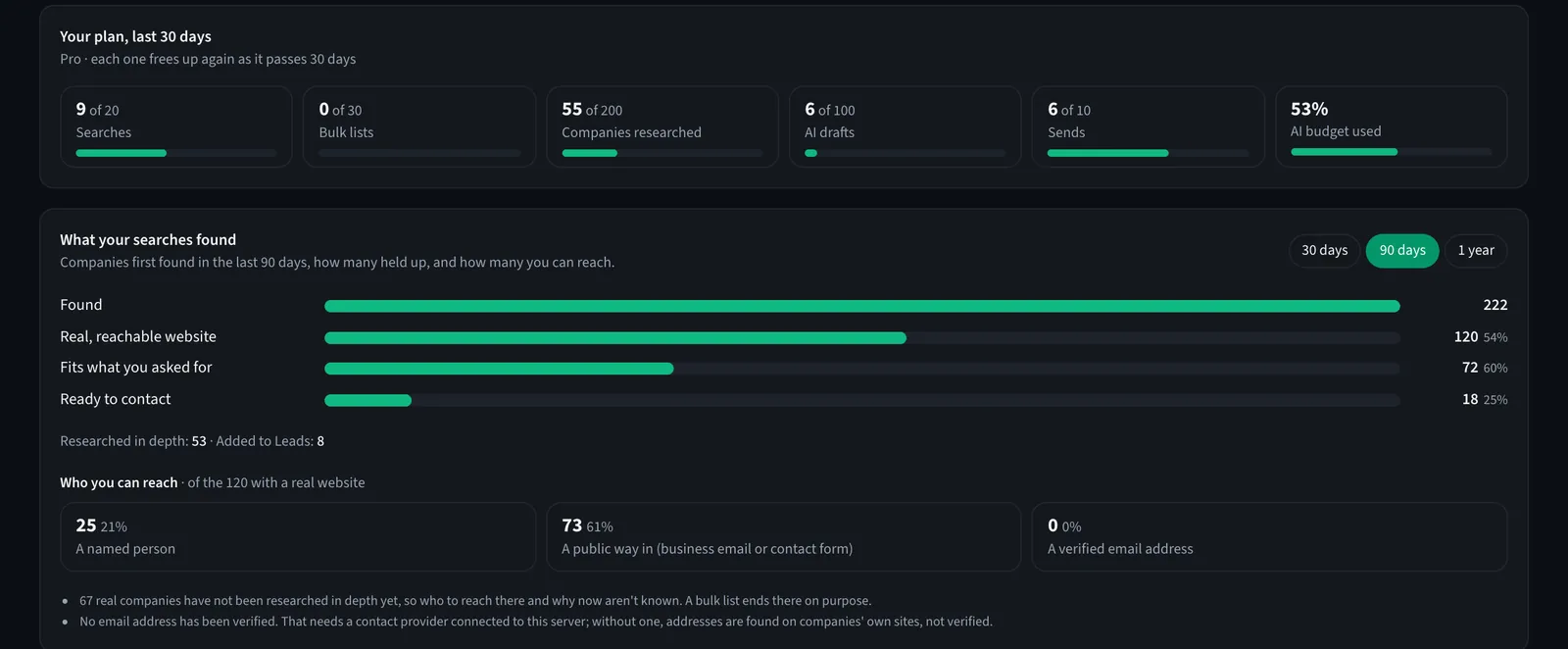
The Results tab is the honest scoreboard of your searches: how many companies were found, how many had a real reachable website, how many fit, how many are ready to contact, and who you can actually reach.
Read those bars as a funnel, not a failure. If few companies fit, your profile may be too wide or the phrasing may be pulling in the wrong kind of business; change one word and search again. If many fit but few are ready, the evidence is thin and a deeper research pass on the best ones is the next step.
What Client Radar will not do
- It does not guarantee contacts. Some markets publish little. A company with no public way in is still shown, with that fact visible.
- It does not invent intent. "Publishes a lot of blog posts" is a signal, not proof that they want to buy anything.
- It does not keep Google Maps listings. Local results exist for that search; you save what you want as a lead under the name you give it.
- It does not search without limits. Searches are counted over a rolling 30 days (free 1, Pro 20), at most five a day, because each one really reads the web and costs real money to run.
How to get more from each search
- One market per search. "Digital marketing agencies in the US with 5 to 30 people" beats "agencies".
- Save the profile. A saved ideal client can be reused with one click and tells the drafting step how to describe you.
- Reject with a reason. Rejected companies never come back, and the reason sharpens the next search.
- Export when you want a spreadsheet. Every prospect, with its evidence, exports to CSV. The research is yours.
Describe who you want in one sentence. Free plan: 1 search every 30 days with 3 companies researched in full, sources shown.
The manual version of this, 15 to 30 minutes per company, is exactly why most freelancers skip research and why cold outreach has a bad name. Doing it properly for ten companies at once is the whole point.
Frequently asked questions
Where does Client Radar get its companies from?
From web search against the profile you confirmed, and from Google Maps for local businesses in a city. It is not a contact database: it finds companies live, then reads their own websites. Contact details appear only where a company publishes them or a connected data provider returns them.
What is a 'dated reason to reach out'?
Something recent and specific the company itself published or that was reported about it: a new product, a hiring post, an expansion, a steady run of blog posts on a topic you serve. Each one carries its date and source, so you can judge whether it is still true before you mention it.
Why does a search find fewer than ten companies?
Because a search keeps only companies that pass its checks: a real, reachable website and a fit with your profile. Ten slots are the ceiling, not a promise. A search that finds four good companies is doing its job.
How many searches do I get?
The free plan includes 1 every 30 days and Pro 20, each up to 10 companies, with at most 5 a day. A search that stops before searching the web is not counted. Top-up packs add one-time searches when the allowance is used up.